Introduction to X11 Law Firm Application
by Jeremy Bischoff, Software Engineer
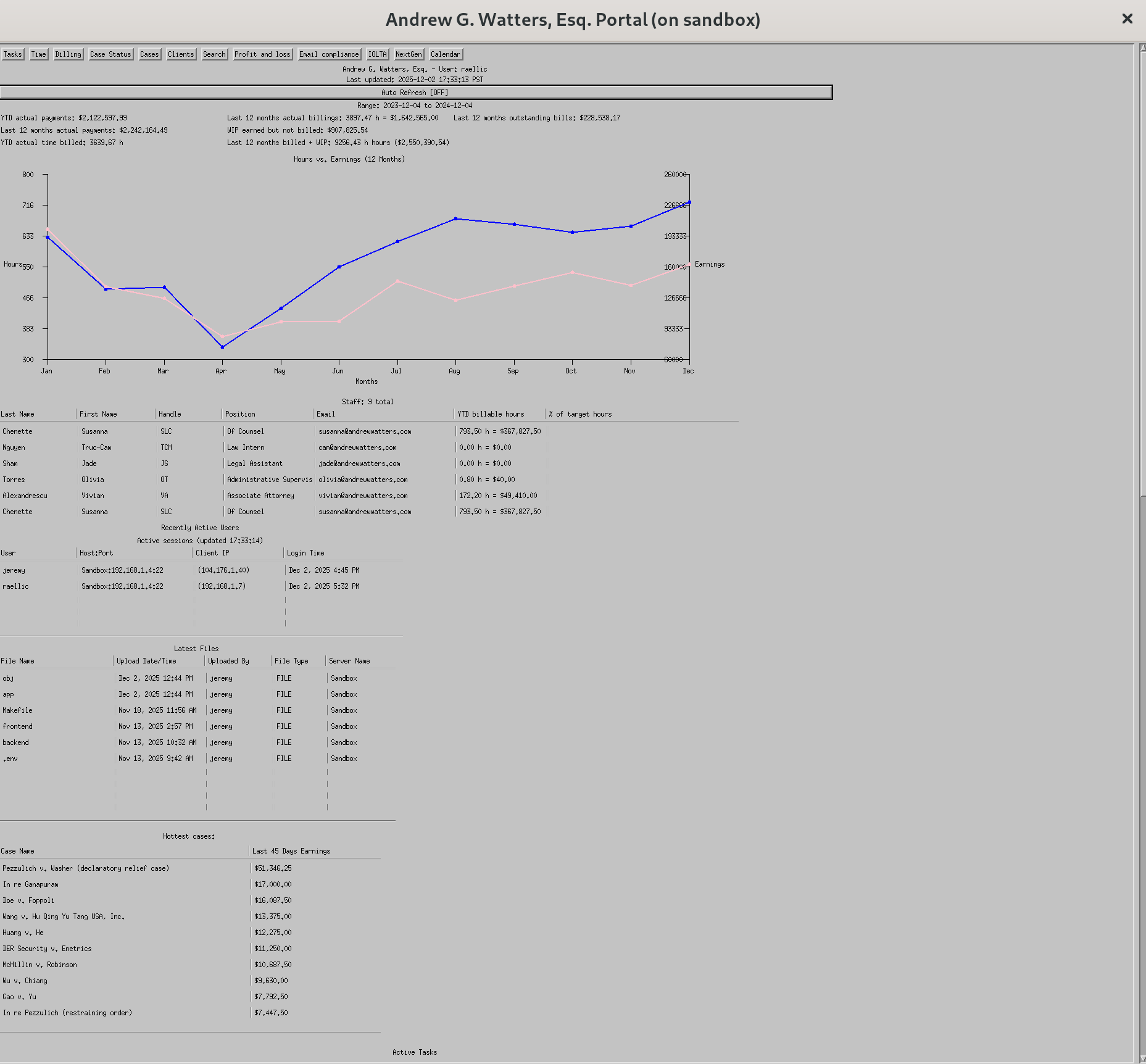
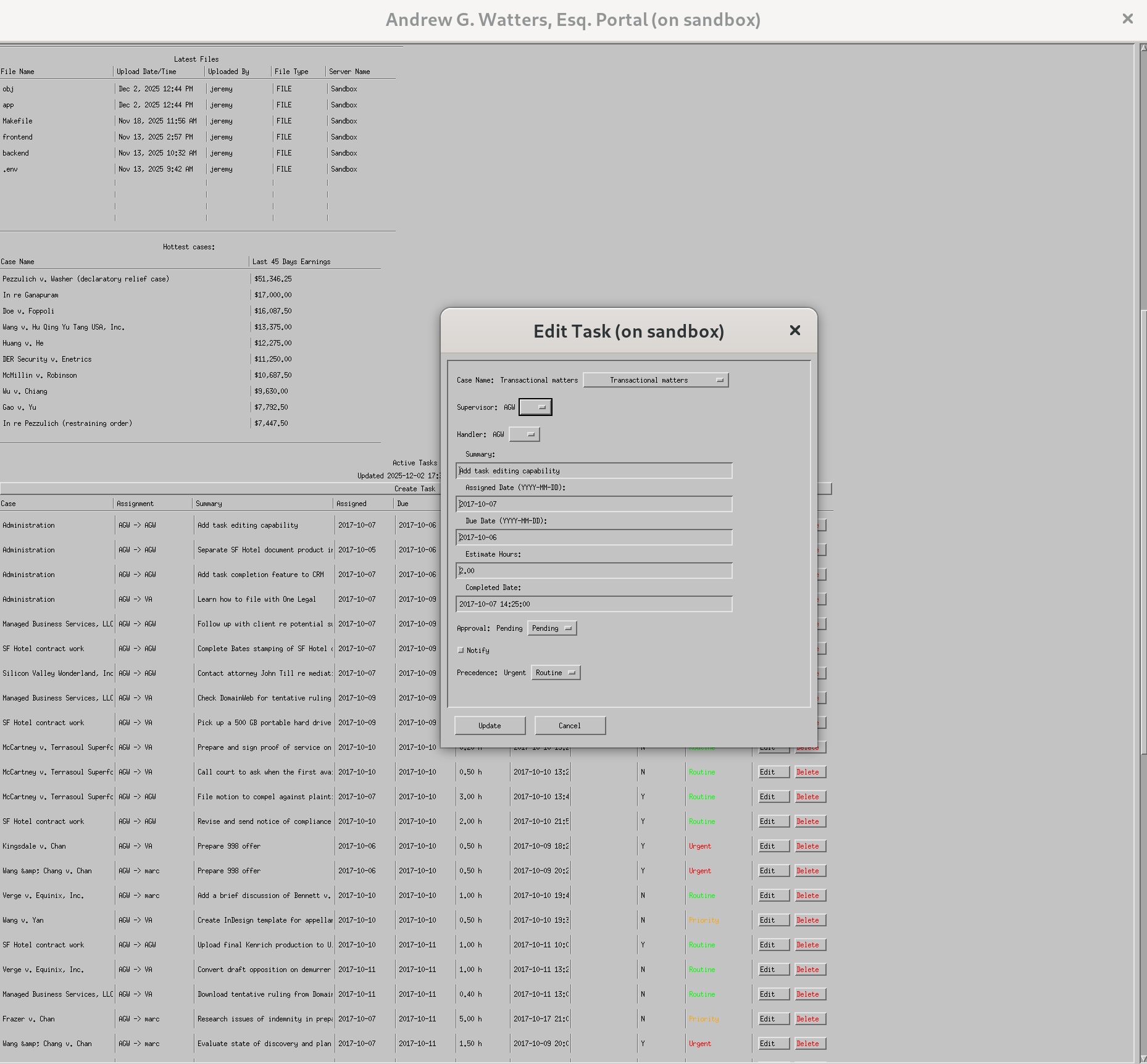
*Mock data for privacy purposes.
For years, the more tech-savvy law firms have relied on web-based dashboards for their internal portals. These systems are familiar and convenient, but they also come with tradeoffs: slow load times, browser overhead, and extra layers between the user and the data. When we began planning the next generation of our firm’s portal, we looked at the workflow of our staff. It became clear that we did not need a browser-based system. We needed something faster, simpler, and more direct.
That is why we are building an X11 application as the firm’s primary portal.
X11 is not new technology. It is stable, well-understood, and already available on every Mac in the office. For our purposes, this works in our favor. We avoid the weight of modern UI frameworks and web stacks, which often introduce complexity and visual overhead that are unnecessary for the use cases of the firm. What we need is predictable, snappy performance with a focused interface that runs natively on our firm’s machines. X11 provides all of this.
Current and planned specifications
The portal’s design is centered on the actual data the firm uses each day. The current in-development version displays several key performance indicators, including payments, billing data, and work-in-progress figures. It also includes an hours-versus-earnings graph that is auto-refreshed on a set interval.
A staff table provides a clear view of positions, billable hours, and target goals. A server-activity table shows recently active users on the portal server. The system also tracks and lists the latest file uploads, giving attorneys and staff a quick view of recent document activity.
Several operational tables are built into the interface. A “hottest cases” table highlights the most profitable and active matters. An active tasks table includes case names, staff assignments, summaries, assigned and due dates, and task precedence, with full create-read-update-delete functionality.
There are also upcoming features in development that will starkly improve the portal’s capabilities. The portal will support document generation through TeX, which lets us produce clean, consistent PDFs without depending on other word processor tools. Email integration is planned as well so that users can send emails efficiently from inside the portal rather than switching to a browser or separate email client. Another exciting component is an XMPP server integration for real-time messaging. This gives the firm an internal chat system that runs directly through our existing XMPP server for both one-to-one messaging and group discussions, all within the same portal interface.
These specifications give the portal practical value immediately, while the planned additions build toward a complete internal operations tool for the firm.
Built for performance
One of the main reasons for choosing X11 is speed. Attorneys open the portal many times throughout the day and should not be waiting on page loads, script bundles, or a browser rendering engine. An X11 client connects directly to the internal database without a web tier in between. Queries return quickly. Windows redraw smoothly. The system runs with very little overhead.
In a typical web architecture you deal with routing layers, controllers, serializers, asset pipelines, frontend frameworks, and a browser that must interpret and render everything. An X11 application avoids these extra components. It keeps a straight path between the interface and the data. The simplicity leads to the performance.
Native support on every workstation
Every attorney and staff member in our firm works on a Mac. macOS already includes the X11 environment required to run the portal, so there is nothing to install and nothing to configure. Users log into the firm’s SSH server and run a single command to launch the program. No one deals with browser extensions, cache resets, or JavaScript errors. The application opens in one window and behaves like any other native program. This leads to real reliability because the portal is protected from the usual problems that come with web browsers: constant updates, rendering inconsistencies, and the chance of someone losing their place by closing a tab. The result is a stable and consistent interface that keeps focus on the work at hand.
A focused interface
The purpose of the portal is to provide information quickly. It is a work tool used inside the firm, not a public-facing product meant to attract outside attention. There is no need for animations, marketing polish, or decorative styling. The interface should fade into the background and allow the information to stand on its own. X11 aligns well with that approach by supporting a clean layout without unnecessary visual features.
A single application window keeps everything contained. There are no scattered tabs or hidden states. The portal functions as a focused environment for documents, deadlines, messages, and status indicators. This simplicity reduces cognitive load and keeps attention centered on the tasks that matter. Nothing competes for focus, which makes the portal a reliable tool for productive legal work rather than another source of distraction.
Minimal system footprint
Most people never think about what a browser costs in terms of memory and energy, but the difference becomes obvious when a portal stays open all day. A typical Chrome tab for a modern web app consumes between 300 and 600 MB of RAM and keeps several processes active under the hood. By contrast, the X11 portal we are building uses 18 MB of memory in its current development state. It has no rendering engine, no JavaScript runtime, and no background layout work. The CPU cost is close to zero when idle, which improves battery life and keeps machines cooler during long days of case work. The lower memory pressure also improves stability and responsiveness across macOS as a whole. With fewer resources tied up in a browser, attorneys experience fewer slowdowns, fewer freezes, and smoother performance when doing work in the portal.
Why the X11 direction?
A law firm portal should be direct, consistent, and easy to use. By choosing X11, we avoid the extra layers and visual complexity that come with modern web stacks. The result is a system that is fast, stable, and straightforward. It is not dependent on shifting UI frameworks and does not need routine redesign. It focuses on the essential tasks and handles them consistently.
In practice, this means a portal that opens quickly, responds without delay, and stays unobtrusive so our attorneys and staff can work without distraction. For our needs, an X11 application is the way to go. The end goal is a portal that supports the firm’s work with speed and consistency, and X11 gives us exactly that.
